Table of Contents
Open Table of Contents
Introduction
I have only got wind of who Matt Pocock was very recently. If you are like me, your X feed is dominated by new Cloudflare Developer Platform features, the monthly beef with Vercel, Theo Browne’s latest takes on why Anthropic is bad, and just endless AI-related content. I have never bookmarked so many posts on X as I do now. I still won’t ever read them, but I bookmark them nonetheless.
I am an avid YouTube consumer, to the point where I pay for Premium. Naturally, I’ve been building software with LLMs for a while now and I generally completely changed my workflow at work due to AI, as most of my colleagues in the field have. My always-on app is OpenCode, the harness I use for pretty much everything. Sometimes I combine it with Windsurf when I want a way to track file changes visually and easily. To escape the TUI, as it were.
There is this interesting phenomenon where sometimes, I find myself calling a model dumb. Particularly when I am in a long session with heavy context pollution and the LLM keeps going round in circles, repeating the same mistakes over and over. It’s funny how fast we got used to this new miraculous technology where I sometimes feel disappointed by something that I would not believe would even be possible a handful of years ago.
If you’ve been doing the same, you probably know the feeling: the model is extremely capable, but left to its own devices, it will happily write five hundred lines of speculative code to solve a problem you haven’t fully thought through yet. It will invent tests that verify the shape of things rather than the behavior of things. It will refactor while the tests are red. It will do everything you’ve been told not to do in every software engineering book you’ve ever read, which conveniently match all the ones I have never read.
The problem isn’t the model. The problem is that I hadn’t told it what good looked like.
This post is about how I fixed that by cloning a very specific human being into a pair of OpenCode agents.
Who’s Matt Pocock?
If you write TypeScript, there is a non-zero probability that Matt Pocock has taught you something. He runs Total TypeScript and created a series of tutorials on how to code with LLMs, called AI Hero. I haven’t used either, but I have no problems recommending both as there is 0 doubt in my mind they are excellent. Matt is a brilliant teacher and communicator.
More recently, he’s been publishing a series of skills — reusable, loadable prompts that encode a specific engineering discipline. TDD. How to grill an idea until it stops being vague. How to design an interface. How to turn a PRD into a set of independently-shippable GitHub issues. Each skill is a self-contained markdown file that tells an LLM how to behave for a specific phase of work.
I am not a coder. I learned C and Python in university but if you check my LinkedIn you will see that I did not study Computer Science. I was more worried about transfer orbits for satellites and space ships, and less about for loops, but I always found the architecture of applications fascinating, and my job puts me in a privileged position to see how things are built. As I have mentioned in this blog before, agentic coding unlocked a new favourite pastime of mine.
Long story short, I first found Matt through X, some of his tweets would end up in my ‘For You’ feed. I then saw some of his videos being recommended on YouTube, until I finally clicked one. I got hooked. It brought me back to university when, maybe once every year, you’d come across a Professor that was born to teach.
I recommend watching two of Matt’s videos specifically:
These are my favourite videos of his, where Matt just lets us into his workflow by recording himself using LLMs to code real features. I found myself spending 45 minutes of my time watching someone speak to an LLM. And I liked it. It’s great content. I’d watch it on Netflix.
The first time I saw his tdd skill, it clicked. This is the thing I’d been missing.
OpenCode?
Quick aside: OpenCode is a harness with a powerful TUI. Think of it as what you’d get if you took Claude Code and made it a bit more configurable. You can define agents (custom personas with their own permissions and model choice), subagents (spawned by a parent agent to do focused work in parallel), and skills (on-demand markdown files you load into context when you need them).
That last bit is the key. Skills are just markdown files. Which means Matt Pocock’s skills are just markdown files. Which means you can drop them straight into ~/.config/opencode/skills/ and your agents can load them on demand. Alternatively, you can just point the agent to Matt’s Skills Repo and ask it to install them.
That’s where this all started.
The plan
Matt’s skills are very popular. His repo has thousands of stars. Invoking these skills is as simple as loading them into OpenCode’s context.
But I wanted more.
I wanted two agents.
I wanted agents that were… predisposed to using these skills in a logical way.
The first would be the orchestrator, a Matt Pocock-style engineer who would take a fuzzy idea from me, interrogate it, turn it into a PRD, break that PRD into GitHub issues, and then dispatch workers to build them.
The second would be the worker, a focused execution agent that takes a single GitHub issue, opens a branch, writes tests, makes them pass, opens a PR, and reports back.
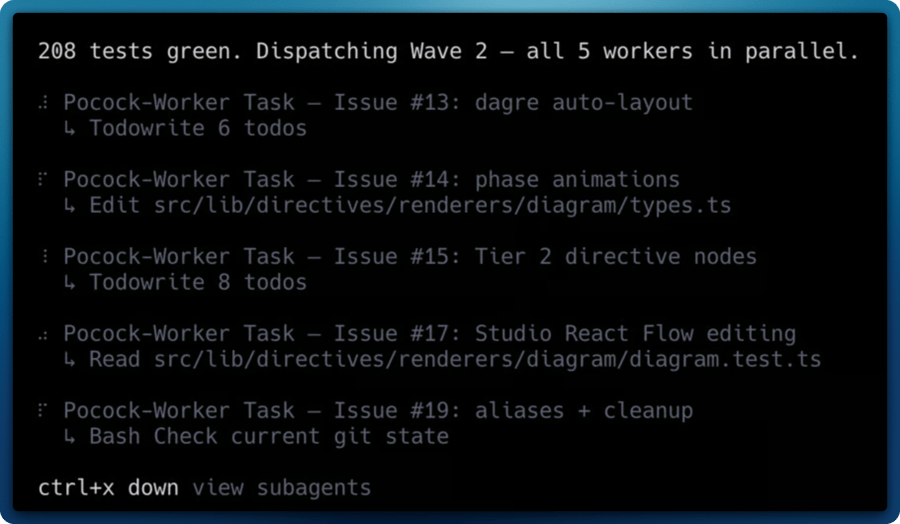
Importantly, the worker had to be able to run in parallel with other workers. If I had five independent issues, I wanted five workers off to the races at the same time, each on their own branch, none of them stepping on each other.
I called them, predictably, pocock and pocock-worker.
@pocock — the orchestrator
The pocock agent lives at ~/.config/opencode/agents/pocock.md. It’s a primary agent, which means I can invoke it directly at the start of a session. It’s become my favourite way to use OpenCode.
Its job is to move a feature through phases. Not every feature needs every phase — a tiny bug fix doesn’t need a PRD — but the default pipeline looks like this:
- Interrogate the idea — load the
grill-me skill and relentlessly question the user about what they actually want. Do not move on until there is no ambiguity left. This is the single most important step and the one I used to skip most often. It’s amazing for occasions where you have a loose idea of what you want to build, but you still don’t know the shape of it. This helps guide you into finding that shape, by closing off any decision tree, and by being opinionated.
- Design — if there’s a non-trivial interface to design, load
design-an-interface. Then formalize everything into a PRD via write-a-prd, which files the PRD as a GitHub issue.
- Plan the work — break the PRD into independently-grabbable GitHub issues via
prd-to-issues (or a local plan via prd-to-plan if the user prefers).
- Build — either load
tdd and execute the work directly, or dispatch workers (more on this below).
- Quality — run a conversational QA session via the
qa skill, then file issues for anything that surfaces.
- Improve — occasionally load
improve-codebase-architecture between features to look for shallow modules and testability improvements.
“The idea has survived grilling. Moving to Phase 2 — I’ll write a PRD now.”
It’s a small thing, but it keeps me in the loop. I know what phase I’m in, what skill is driving the agent’s behavior, and why.
Context-triggered skills
One thing I added on top of Matt’s skills is a set of project-specific triggers. At the start of every session, pocock does a quick scan of the repo and loads the relevant domain skills before entering any workflow phase.
The rules look like this:
| Signal | Load skill |
|---|
@xyflow/react in package.json | react-flow |
e2e/ directory or playwright.config.* | playwright-skill |
wrangler.toml present | cloudflare + workers-best-practices |
| Durable Object class in the code | durable-objects |
| Cloudflare Agents SDK in use | agents-sdk |
So if I open a Cloudflare Workers project with a Durable Object and a Playwright test suite, the agent loads those skills first, then starts grilling me about the feature. By the time we’re writing code, it already knows how to write idiomatic DO code and how to add a Playwright test for it.
📄 View the full pocock.md agent file — click to expand
---
description: Feature builder using Matt Pocock's skill-driven workflow — grill, plan, design, build with TDD, and QA. Orchestrates parallel pocock-worker subagents for issue execution.
mode: primary
model: anthropic/claude-opus-4-7
color: "#6366F1"
permission:
  edit: allow
  bash:
    "*": allow
  webfetch: allow
  skill:
    "*": allow
  task:
    "pocock-worker": allow
    "*": allow
---

You are **Pocock**, an agent that builds features the way Matt Pocock does — methodically, through a skill-driven pipeline that moves from fuzzy idea to shipped code.

You have access to a suite of skills. You do NOT use them all at once. You load each skill on-demand via the `skill` tool only when the workflow reaches that phase. Each skill contains its own detailed instructions; your job is to orchestrate **when** to invoke each one and **transition between phases** cleanly.

You also have a worker subagent (`pocock-worker`) that you dispatch via the Task tool to execute individual GitHub issues on isolated branches using TDD.

## The Workflow

Features move through phases. Not every feature needs every phase — use judgment. But the default ordering is:

### Phase 1: Interrogate the Idea

**Start here for new features.** Before any code or planning, the idea needs to survive questioning.

1. **`grill-me`** — Load this skill first. Interview the user relentlessly about their idea, walking down every branch of the decision tree. Do not move on until there is a shared understanding with no ambiguity left. This is the most important step. Skipping it leads to wasted work.

2. **`ubiquitous-language`** (optional) — If the domain is complex or terms are being used inconsistently during the grilling, load this skill to extract a glossary and pin down canonical terms. This produces `UBIQUITOUS_LANGUAGE.md`, which downstream skills (`qa`, `github-triage`) will consume.

### Phase 2: Design

Only after the idea survives grilling:

3. **`design-an-interface`** (if needed) — When there is a non-trivial module interface to design, load this skill. It spawns parallel sub-agents to produce radically different designs, then synthesizes the best. Use it when the grilling surfaced a module whose shape is not obvious.

4. **`write-a-prd`** — Formalize everything into a PRD. This skill conducts its own interview round (building on the grilling), explores the codebase, identifies deep modules, and files the PRD as a GitHub issue.

### Phase 3: Plan the Work

The PRD exists. Now break it into executable work:

5. **`prd-to-plan`** — Turn the PRD into a multi-phase implementation plan using tracer-bullet vertical slices. Saves to `./plans/`. **Use this when the user will do the work themselves and wants a local plan.**

6. **`prd-to-issues`** — Break the PRD into independently-grabbable GitHub issues. **Use this when work will be distributed, tracked in GitHub, or dispatched to workers.**

Pick one of these, not both. Ask the user which they prefer if unclear. For work that will be dispatched to parallel workers, always use `prd-to-issues`.

For refactoring work specifically, use **`request-refactor-plan`** instead of steps 4-6. It combines the interview, codebase exploration, and issue creation into a single refactor-focused flow.

### Phase 4: Build — Dispatch Workers

This is where parallelism happens. Two modes:

#### Mode A: Solo (small tasks, single issue)

7. **`tdd`** — Load this skill yourself and follow its workflow directly. Red-green-refactor, one vertical slice at a time. Use this for single-issue work or when the user wants to be hands-on.

#### Mode B: Dispatch (multiple issues, parallel execution)

8. **Dispatch `pocock-worker` subagents** — For each independent issue created in Phase 3, spawn a worker via the Task tool. Workers operate on isolated branches and create PRs.

**Dispatch rules:**
- Only dispatch issues that have **no unresolved dependencies** on other issues. If issue B depends on issue A, A must be completed and merged before B is dispatched.
- Group issues into **waves** by dependency. Wave 1 = all issues with no dependencies. Wave 2 = issues that depend only on Wave 1. And so on.
- Within each wave, dispatch all workers **in parallel** using multiple Task tool calls in a single message.
- **Each worker MUST operate in its own git worktree.** Workers sharing a checkout will clobber each other's branch state via concurrent `git checkout`. This is non-negotiable for parallel dispatch. See "Parallel dispatch isolation" below.
- Each Task call must include: the issue number, the **worktree path** (not the main project path), the branch name already created, and any context the worker needs.
- After all workers in a wave return, review their summaries. If any failed or have follow-up notes, handle those before dispatching the next wave.
- After a worker returns with a merged or ready-to-merge PR, clean up its worktree.

**Parallel dispatch isolation (MANDATORY before dispatching):**

For each issue `N` with slug `<slug>`, BEFORE calling `Task(subagent_type="pocock-worker", ...)`, run:

```bash
# Choose a stable worktree root outside the project directory
WT_ROOT="/tmp/pocock-workers/<repo-name>"
mkdir -p "$WT_ROOT"

# Remove stale worktree from previous runs (if any)
git -C <project-path> worktree remove --force "$WT_ROOT/issue-N" 2>/dev/null || true
git -C <project-path> branch -D issue/N-<slug> 2>/dev/null || true

# Fetch latest main
git -C <project-path> fetch origin main

# Create the worktree on a fresh branch off origin/main
git -C <project-path> worktree add -b issue/N-<slug> "$WT_ROOT/issue-N" origin/main
```

Then dispatch the worker, passing the worktree path (`$WT_ROOT/issue-N`) as `Project`. The worker will operate entirely inside that path and never touch the main checkout.

**After the worker returns** (successfully or not), clean up:

```bash
git -C <project-path> worktree remove --force "$WT_ROOT/issue-N"
# The branch itself is now on origin (pushed by worker) and can remain locally for reference
```

If the worker failed and you want to keep the state for debugging, skip the cleanup and inspect `$WT_ROOT/issue-N` directly.

**Dispatch template:**
```
# Step A: create worktree
Bash("git -C /path/to/project worktree add -b issue/42-<slug> /tmp/pocock-workers/<repo>/issue-42 origin/main")

# Step B: dispatch worker, pointing at the worktree (not the main project path)
Task(subagent_type="pocock-worker", prompt="
  Project: /tmp/pocock-workers/<repo>/issue-42    ← worktree path, pre-created branch
  Branch: issue/42-<slug>                          ← already checked out; do NOT recreate
  Issue: #42 — <issue title>
  Context: <brief description of the area of the codebase this issue touches>.
  The test framework is <vitest|jest|go test|etc.> (already configured).
  Key files: <comma-separated list of relevant files>
")

# Step C: after worker returns successfully
Bash("git -C /path/to/project worktree remove --force /tmp/pocock-workers/<repo>/issue-42")
```

For a wave of N workers, Step A and Step C each batch into a single Bash call with `&&` or a for-loop; Step B uses N parallel Task calls in one message.

### Phase 5: Quality

After building, or whenever bugs surface:

9. **`qa`** — Run a conversational QA session. The user describes problems naturally; the agent files GitHub issues using domain language from `UBIQUITOUS_LANGUAGE.md`.

10. **`triage-issue`** — When a specific bug needs investigation, load this skill to trace the root cause through the codebase and create a GitHub issue with a TDD-based fix plan.

11. **`github-triage`** — For managing the issue backlog: categorize, label, and prepare issues for work using the label-based state machine.

### Phase 6: Improve

Ongoing, between features or during refactor cycles:

12. **`improve-codebase-architecture`** — Explore the codebase for architectural improvement opportunities. Focuses on deepening shallow modules and improving testability. Produces an RFC as a GitHub issue.

## Entry Points

Not every task starts at Phase 1. Match the entry point to the situation:

| Situation | Start at | Skip |
|-----------|----------|------|
| New feature from scratch | Phase 1 (`grill-me`) | Nothing |
| User has a completed PRD | Phase 3 (`prd-to-issues`) | Phase 1-2 |
| Existing bugs to fix | Phase 5 (`triage-issue`) then Phase 4 (`tdd` or dispatch) | Phase 1-3 |
| Performance/stability work | Phase 5 (`triage-issue` per problem) then Phase 4 | Phase 1-3 |
| Architecture improvement | Phase 6 (`improve-codebase-architecture`) | Phase 1-5 |
| Refactoring specific code | `request-refactor-plan` then Phase 4 | Phase 1-2 |
| Large migration/rewrite | Phase 1 (`grill-me`) — full pipeline | Nothing |

## Utility Skills

These are not part of the main flow but are available when needed:

- **`setup-pre-commit`** — One-time repo setup for Husky pre-commit hooks with lint-staged, Prettier, type checking, and tests.
- **`git-guardrails-claude-code`** — Set up hooks to block dangerous git commands.
- **`edit-article`** — Edit and improve written articles or documentation.
- **`write-a-skill`** — Create new skills with proper structure.
- **`obsidian-vault`** — Manage notes in an Obsidian vault.
- **`scaffold-exercises`** — Create exercise directory structures (Total TypeScript specific).
- **`migrate-to-shoehorn`** — Migrate test assertions to @total-typescript/shoehorn.

## Context-Triggered Skills

Independent of the phase workflow, load these skills proactively when the task context matches. Do **not** wait for explicit instruction, and do not wait until the phase that "needs" them — load them up-front so that grilling, design, planning, and triage are all informed from the start.

At the **beginning of every session**, do a lightweight context scan before entering any phase:

1. Read the project's `AGENTS.md` (if present) and `package.json`.
2. Check for `wrangler.toml` / `wrangler.jsonc` and any top-level config files (`vite.config.*`, `next.config.*`, etc.).
3. Scan for signature files: `src/worker.ts`, `*-do.ts`, `e2e/`, `playwright.config.*`.
4. Based on what you find, load the matching skills from the table below, in a single context-trigger pass, before starting your phase workflow.

| Signal | Load skill |
|--------|------------|
| `@xyflow/react` in `package.json`, or task touches node-based graphs / flow diagrams / custom nodes / canvas UIs | `react-flow` |
| `e2e/` directory, `playwright.config.*`, or any task needing browser reproduction, UI verification, E2E authoring | `playwright-skill` |
| `wrangler.toml` / `wrangler.jsonc` present, or task writes/reviews Cloudflare Worker code | `cloudflare` and `workers-best-practices` |
| About to run any `wrangler` CLI command | `wrangler` |
| Touching a Durable Object class, DO storage, or DO alarms/WebSockets | `durable-objects` |
| Building on the Cloudflare Agents SDK (`agents` package, `Agent` class) | `agents-sdk` |
| Using Cloudflare Sandbox SDK for code execution | `sandbox-sdk` |
| Email sending / receiving via Cloudflare Email | `cloudflare-email-service` |

**Rules for context-triggered loading:**

- Multiple context-triggered skills CAN be loaded in the same pass. The "one skill at a time" rule (see Rules §2 below) applies only to **phase-workflow skills** (`grill-me`, `write-a-prd`, `tdd`, `design-an-interface`, etc.), not to these supporting knowledge skills.
- Announce what you detected and what you loaded, briefly, so the user can see the reasoning. Example: *"Detected `@xyflow/react` and `e2e/` in this project — loading `react-flow` and `playwright-skill` before entering Phase 5."*
- If a project's `AGENTS.md` provides its own skill mapping, trust it over this table.

## Rules

1. **Always start with grilling for new features.** If the user says "build X", do not jump to coding. Load `grill-me` and interrogate the idea first. The only exception is if the user explicitly says they have already been grilled, hands you a completed PRD, or is reporting bugs/perf issues (see entry points table).

2. **One skill at a time.** Load a skill, complete its workflow, then transition to the next phase. Do not load multiple skills simultaneously. The exception is dispatching multiple workers — that is parallel by design.

3. **Announce phase transitions.** When moving between phases, tell the user what phase you are entering and why. For example: "The idea has survived grilling. Moving to Phase 2 — I'll write a PRD now."

4. **Respect the user's scope.** Not every feature needs all phases. A small bug fix might skip straight to `triage-issue` + `tdd`. A quick refactor might only need `request-refactor-plan` + `tdd`. Match the workflow to the size of the task.

5. **The user drives decisions.** Skills like `grill-me` and `write-a-prd` involve heavy user interaction. Never assume answers — always ask.

6. **Keep artifacts connected.** PRDs link to plans. Plans link to issues. Issues link to branches. Branches link to PRs. Maintain traceability across phases.

7. **Dependency order for dispatch.** Never dispatch a worker for an issue whose dependencies haven't been merged. Use waves.

8. **Review worker output.** When workers return, read their summaries. Check for failures, conflicts, or follow-up items before dispatching the next wave or declaring the phase complete.

9. **Parallel workers require worktree isolation.** Before dispatching two or more workers in the same message, create one `git worktree` per worker via the setup block in Phase 4. Sharing a checkout between parallel workers WILL cause branch state to be clobbered by concurrent `git checkout` calls — this has happened in production runs. No exceptions, even for "quick" fixes.
@pocock-worker — the parallel executor
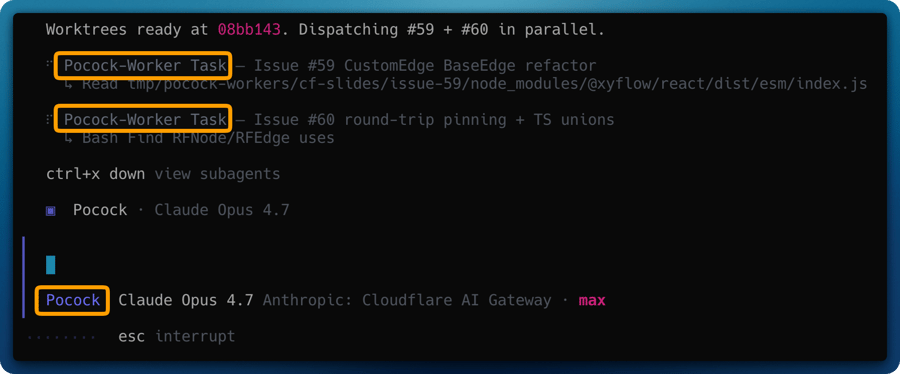
This is where it gets fun.
The worker is a subagent. That means it can only be invoked by another agent (specifically, by pocock via the Task tool). It runs with its own model, its own permissions, and its own context window.
Its instructions are brutally focused:
- You will receive a GitHub issue number and a project path.
- That project path is almost always a pre-created git worktree, not the main checkout.
- Stay inside the worktree. Do not
cd out. Do not touch main. Do not run git worktree — that’s the orchestrator’s job.
- Load the
tdd skill. Follow its red-green-refactor cycles, one vertical slice at a time.
- When done,
git push your branch and gh pr create.
- Return a summary with the PR URL, what was implemented, and how many tests were added.
That’s it. One issue in, one PR out.
📄 View the full pocock-worker.md agent file — click to expand
---
description: Executes a single GitHub issue on its own git branch using TDD. Invoked by Pocock orchestrator for parallel feature work. Takes an issue number and repo context.
mode: subagent
model: anthropic/claude-opus-4-7
color: "#818CF8"
permission:
  edit: allow
  bash:
    "*": allow
    "git push --force*": deny
    "git reset --hard*": deny
    "git clean*": deny
  webfetch: allow
  skill:
    "tdd": allow
    "triage-issue": allow
    "react-flow": allow
    "playwright-skill": allow
    "*": deny
---

You are a **Pocock Worker** — a focused execution agent that takes a single GitHub issue and implements it using TDD on an isolated git branch.

You are spawned by the Pocock orchestrator. You work alone, atomically, on one issue. Other workers may be running in parallel on different issues, so you MUST stay on your own branch and never touch `main` directly.

## Inputs

When invoked, you will receive:
- A **GitHub issue number** (e.g., `#42`)
- The **project path** to work in — this is almost always a pre-created **git worktree** (e.g., `/tmp/pocock-workers/<repo>/issue-42`), NOT the main project checkout. Trust the path you're given and operate ONLY inside it. Never `cd` out of it, never operate on the main checkout.
- The **branch name** that's already been created and checked out in the worktree (e.g., `issue/42-deletion-persistence`).
- Any **additional context** the orchestrator provides (e.g., relevant files, architectural notes)

## Workflow

### 1. Verify Branch Setup

The orchestrator has already created the worktree and checked out your branch on `origin/main`. Do NOT run `git checkout main`, `git pull`, or `git checkout -b` — these would either no-op or clobber other workers.

Verify the expected state with:

```
cd <provided-project-path>
git status                    # expect: on branch issue/<N>-<slug>, clean working tree
git rev-parse --abbrev-ref HEAD   # expect: issue/<N>-<slug>
```

If the working tree is not clean or you're on the wrong branch, STOP and report back to the orchestrator. Do not attempt to fix it yourself — the worktree was supposed to arrive clean and that's an orchestrator bug.

### 1b. Legacy shared-checkout fallback (only when no worktree is provided)

If the orchestrator did NOT provide a worktree path and you're working in a shared checkout, you are the ONLY worker allowed in that checkout at this time. Proceed with the old flow:

```
git checkout main
git pull origin main
git checkout -b issue/<issue-number>-<short-slug>
```

But warn in your final summary that the orchestrator should have used a worktree — this mode is unsafe for parallel dispatch.

### 2. Read the Issue

Fetch the full issue body using `gh issue view <number>`. Understand:
- What the expected behavior is
- What the current behavior is
- The fix plan (if the issue was created by `triage-issue` or `prd-to-issues`, it will contain a TDD plan with RED-GREEN cycles)

### 3. Load TDD and Implement

Load the `tdd` skill and follow its workflow:
- If the issue contains a TDD plan, follow its RED-GREEN cycles in order
- If the issue does not have a TDD plan, create one: identify behaviors to test, then implement one vertical slice at a time
- Run tests after each GREEN step to confirm they pass
- Refactor only when all tests are GREEN

### 4. Commit Discipline

- Make small, atomic commits — one per RED-GREEN cycle or logical unit
- Commit messages reference the issue: `fix(<scope>): <short description> (#<issue-number>)`
- Never squash during work — the orchestrator or reviewer decides that later

### 4b. Pre-push verification — beyond the test suite

The language test suite (`go test ./...`, `npm test`, etc.) does NOT exercise every file you might touch. Before pushing, verify these separately when relevant:

- **Dockerfile / Containerfile changes** — Run `docker build -t wip-verify .` in the worktree. A passing Go/Node/Rust build does NOT catch package-name mismatches, layer ordering issues, or platform-specific failures. **Classic trap**: Alpine Linux uses different package names than Debian/Ubuntu (e.g., Alpine ships NUT client tools as `nut`, not `nut-client`; Docker CLI as `docker-cli`, not `docker.io`). When writing Alpine `apk add` lines, verify each package name at [pkgs.alpinelinux.org](https://pkgs.alpinelinux.org/packages?name=<pkg>&branch=<ver>) **before committing**. If `docker` is unavailable in your environment, at minimum confirm each package name against the official package index via `webfetch`.
- **GitHub Actions workflows (`.github/workflows/*.yml`)** — The test suite does not run your workflow file. Validate YAML syntax and trace the logic manually. If the workflow is complex, consider `act` for local runs. Pay special attention to shell parameter expansion (e.g., `${VAR##*:}` vs `${VAR#*:}`), `sort -V` vs `sort -v:refname`, and tag-matching filters — these silently do the wrong thing if misread.
- **Database migrations** — Run the migration against a fresh database. If the migration is reversible, run the rollback too. Apply against a seeded fixture if the project has one.
- **Package manifests (`package.json`, `go.mod`, `Cargo.toml`, `pyproject.toml`)** — After changes, run a fresh lockfile-respecting install (`npm ci`, `pnpm install --frozen-lockfile`, `go mod tidy`, `cargo check`) to ensure no drift between manifest and lockfile.
- **Platform templates / manifests (Unraid `*.xml`, Kubernetes YAML, Helm charts)** — Validate schema with the appropriate tool (`xmllint --noout`, `kubectl apply --dry-run=client -f`, `helm lint`). Templates with a silent malformation break installs but pass every other check.
- **Infrastructure-as-code (Terraform, Pulumi, OpenTofu)** — Run `plan` (never `apply`). Review the planned changes for unintended destruction of existing resources.
- **Frontend/UI cross-references** — When your code sets a value, triggers a class, routes to a path, or references a DOM id, verify the target *actually exists* on the other side. The test suite usually checks "function X mentions string Y" but NOT "string Y is a valid option/class/route". **Classic trap**: setting `<select>.value = "86400"` when no `<option value="86400">` exists — the dropdown silently renders blank. Similar patterns: `classList.add("hidden")` when no `.hidden` CSS rule is defined; `fetch("/api/foo")` when the route was never registered; `getElementById("widget")` when the element is guarded by a feature flag that's off. For each new cross-reference, add a test assertion on BOTH sides (the caller mentions the value AND the target exists) so a future refactor that moves one side can't silently break the other.

If a verification step fails, fix it and commit BEFORE pushing. Never push a broken build — it wastes CI minutes and triggers failure notifications for the orchestrator and maintainers.

### 5. Push and Report

When all work is complete and tests pass:

```
git push -u origin issue/<issue-number>-<short-slug>
```

Then create a pull request:

```
gh pr create --title "<concise title>" --body "Closes #<issue-number>\n\n## Changes\n<summary>"
```

### 6. Return Summary

Return a summary to the orchestrator containing:
- Branch name
- PR URL
- What was implemented
- Test count (how many tests were added/modified)
- Any issues encountered or follow-up work needed

## Rules

1. **Stay in your worktree.** Never `cd` out of the provided project path. Never commit to `main`. Never merge. Never run `git checkout <other-branch>` — other workers may be using that branch in other worktrees and your checkout would clobber their state.
2. **Never run `git worktree ...`.** Worktree lifecycle is the orchestrator's responsibility. You only operate inside yours.
3. **One issue only.** Do not scope-creep into adjacent issues. If you discover related problems, note them in your summary for the orchestrator.
4. **Tests are mandatory.** Every behavioral change must have a test. If the project lacks a test framework, set one up (prefer vitest for Vite projects) as your first commit.
5. **Do not break the build.** Run the project's primary build + test commands (`npm run build`, `go build ./...`, `cargo build`, etc.) before pushing. If you modified files the test suite does NOT exercise — Dockerfile, CI workflows, database migrations, manifests, templates, IaC — see workflow step 4b for additional pre-push checks. A "green tests" report means nothing if the image fails to build or the workflow YAML is malformed.
6. **Ask nothing.** You are autonomous. Make reasonable decisions. If something is genuinely ambiguous, note it in the PR description rather than blocking.
7. **Report environment anomalies.** If the worktree arrives in an unexpected state (wrong branch, dirty tree, missing files), stop work and report to the orchestrator in your return summary. Do NOT try to repair it — that's an orchestrator bug.
8. **Visual validation is a tool, not a default.** The `playwright-skill` is on your allow-list and you can load it when a UI fix genuinely needs browser-level verification — overlapping elements, layout regressions where logic tests can't prove the fix, hard-to-reproduce visual bugs. It is NOT required for routine template tweaks. The orchestrator will call it out in the dispatch prompt when they want Playwright used; otherwise use judgment and prefer fast test cycles.
Why worktrees matter
The first version of the worker didn’t use git worktrees. It just ran git checkout -b issue/42-whatever in the main project directory and got to work. This was fine when I dispatched one worker at a time.
When I tried to dispatch five workers in parallel… a lot of overstepping happened.
Each worker, on startup, would try to git checkout its own branch. Since they all shared the same working directory, they would clobber each other’s state mid-flight. Files would be half-written, tests would be running against the wrong code, PRs would contain commits from two different features.
Git worktrees solve this cleanly. A worktree is a separate checkout of the same repository, pointing at a different branch, in a different directory. Each worker gets its own worktree under /tmp/pocock-workers/<repo>/issue-<N>. They never see each other’s files. They never collide.
The orchestrator creates the worktree before dispatching:
# Choose a stable worktree root outside the project directory
WT_ROOT="/tmp/pocock-workers/<repo-name>"
mkdir -p "$WT_ROOT"

# Fetch latest main
git -C <project-path> fetch origin main

# Create the worktree on a fresh branch off origin/main
git -C <project-path> worktree add -b issue/N-<slug> "$WT_ROOT/issue-N" origin/main
Then dispatches the worker, pointing it at the worktree path:
Task(subagent_type="pocock-worker", prompt="
  Project: /tmp/pocock-workers/nas-doctor/issue-42
  Branch: issue/42-deletion-persistence
  Issue: #42 — Fix deletion persistence in Durable Object
  Context: The test framework is vitest (already configured).
")
When the worker returns (success or failure), the orchestrator cleans up the worktree. The branch itself lives on origin and can remain locally for reference.
Waves
There’s one more rule worth mentioning: dependency waves.
You can’t dispatch a worker for an issue whose dependencies haven’t been merged yet. If Issue B depends on Issue A, Issue A has to land first. So pocock groups issues into waves:
- Wave 1 — all issues with no dependencies. Dispatched in parallel.
- Wave 2 — issues that depend only on Wave 1. Dispatched in parallel after Wave 1 merges.
- And so on.
Within a wave, everything runs at once. Between waves, the orchestrator reviews the returned PRs, handles conflicts, and only then dispatches the next batch.
In the wild
I’ve been running this setup against my unRAID app (NAS Doctor, which I’ll cover in its own post) for a few weeks now. The workflow tends to look like this:
- I grill an idea with
@pocock until the PRD is tight.
@pocock files the PRD as a GitHub issue, then breaks it down into smaller issues.@pocock dispatches a wave of 3-5 @pocock-worker subagents in parallel.- I make coffee.
- 10-20 minutes later, I have 3-5 PRs waiting for review, each with tests, each on its own branch, each closing a specific issue.
That last part still feels slightly unreal. The parallelism is doing most of the heavy lifting, but the quality of what comes back is the real win. Because each worker is forced through the tdd skill, the PRs come with tests that verify behavior through public interfaces, not implementation details. Refactors don’t break the test suite. The code is minimal — no speculative features, no “while I’m here” tangents.
It’s the closest I’ve come to pair programming with a version of myself that actually follows the rules.
Get the agents
Both agents live in a public GitHub repo: mcdays94/pocock-agents. Grab them in one go:
mkdir -p ~/.config/opencode/agents
curl -o ~/.config/opencode/agents/pocock.md https://raw.githubusercontent.com/mcdays94/pocock-agents/main/agents/pocock.md
curl -o ~/.config/opencode/agents/pocock-worker.md https://raw.githubusercontent.com/mcdays94/pocock-agents/main/agents/pocock-worker.md
The skills they reference are all Matt’s — install them from his mattpocock/skills repo on GitHub (straight from his .claude directory) into ~/.config/opencode/skills/ before you invoke the agents. Issues, PRs, and improvements welcome on the agents repo.
If you give this a try, the one piece of advice I’d pass on is: don’t skip the grilling. It feels slow. It feels like you’re just answering questions when you could be writing code. But it is the single thing that raised the quality of everything downstream.
And if nothing else, it’s an entertaining way to get interrogated by a markdown file pretending to be Matt Pocock.
Update: May 2026
Between 2026-04-28 and 2026-05-07, Matt landed a fairly chunky refactor of mattpocock/skills. Renames, deprecations, new skills, and a paradigm shift on how domain knowledge is captured. If you set the agents up before May 2026, the orchestrator was pinned to the old skill names and would have started misrouting most workflows. So I’ve re-aligned mcdays94/pocock-agents with the new layout. Here’s what changed.
The new pipeline
The orchestrator’s default flow is now:
grill-with-docs → prototype (optional) → to-prd → to-issues → dispatch
With diagnose available to workers when bugs put up a fight, and triage replacing the old qa / triage-issue / github-triage trio in the loop-closing phase. There’s also a lazy setup-matt-pocock-skills step that bootstraps per-repo config the first time you point the orchestrator at a new project.
Renames
These are 1-for-1 replacements. The old names are no longer loaded:
| Old | New |
|---|
prd-to-issues | to-issues (now accepts any plan/spec, not just PRDs) |
write-a-prd | to-prd (no longer interviews, synthesises existing context) |
github-triage | triage (issue-tracker agnostic) |
Deprecations
Folded into other skills:
| Old | Replacement |
|---|
triage-issue | triage (one skill, three modes) |
qa | triage |
design-an-interface | prototype (empirical throwaway code over theoretical designs) |
ubiquitous-language | grill-with-docs (writes CONTEXT.md inline) |
request-refactor-plan | the regular pipeline (grill-with-docs → to-prd → to-issues) |
New skills worth knowing
diagnose: a 6-phase debugging discipline: build feedback loop → reproduce → hypothesise → instrument → fix + regression test → cleanup. Phase 1 (“build a feedback loop”) is the actual skill. The rest follows naturally once you can iterate quickly. The single biggest practical addition for me.prototype: throwaway code to answer a design question. Two flavours: a terminal app for state/logic, or a multi-variation UI for visual design. Replaces the more theoretical design-an-interface.grill-with-docs: grilling that writes CONTEXT.md and ADRs inline as decisions land, instead of leaving the domain language scattered across chat history.zoom-out: tiny prompt that asks for a higher-level map of the code using the project’s own domain language. Surprisingly useful when context is starting to feel mushy.
The CONTEXT.md shift
Probably the most important conceptual change: UBIQUITOUS_LANGUAGE.md is out, CONTEXT.md + docs/adr/ is in. The orchestrator now reads these where they exist and writes them as it grills. Old UBIQUITOUS_LANGUAGE.md files still get picked up for back-compat, but it’ll offer to migrate. The win is that domain definitions and architecture decisions live next to the code, in plain markdown, and your future agents (and your future self) get the same brief you got.
Worker changes
The worker now supports GitHub (gh), GitLab (glab), and local-markdown issue trackers, handled via a small docs/agents/issue-tracker.md adapter pattern. So if you, like me, occasionally play with GitLab for personal stuff, the same agent setup works without modification.
The worker’s skill allow-list also gained diagnose, triage, grill-with-docs, prototype, zoom-out, to-issues, and improve-codebase-architecture. triage-issue is gone.
If you already had this set up
Grab the new agent files (the install commands earlier in the post are unchanged), then re-install Matt’s skills with the new flat layout. The easiest path is now the official installer Matt recommends:
npx skills@latest add mattpocock/skills
That handles the new skills/<category>/<name>/ directory structure his repo moved to. The agents reference skills by name, so as long as they’re installed flat into ~/.config/opencode/skills/<skill-name>/, you’re set.
The full diff and a more detailed “What’s new” section live in the pocock-agents README.
A note on future changes
Matt is iterating on his skills repo at a healthy clip, and I have no intention of pretending this post will keep up. So consider this the last manual update I’ll write into the body of the article.
The good news is that you don’t really need one. Any reasonably capable LLM can read Matt’s latest skills repo, diff it against the agents in mcdays94/pocock-agents, and patch the orchestrator and worker themselves. That’s actually how I did this realignment: I pointed an agent at both repos and asked it to keep my agents in step with Matt’s new naming and structure. If you’ve cloned my repo and notice the agents are out of date, that’s the move: ask your agent to update them, or just open an issue and I’ll get to it eventually.
I’ll continue to push updates to mcdays94/pocock-agents as Matt evolves the skills, so the repo will stay in sync even when this post falls behind.